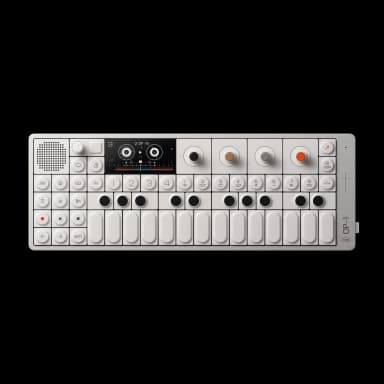
OP-1 Field FAQ

25 answers to the most common questions about the Teenage Engineering OP-1 Field. Can't find what you need? Ask the AI.

How do I record to tape?

Recording to tape on the OP-1 Field is straightforward. First select a sound in synth or drum mode, then press the tape key, choose a track, and hold ...

What are the different tape styles?

The OP-1 Field has four tape styles, each offering 6 minutes of recording time across 4 stereo tracks at 32-bit resolution. They differ in character a...

How do I sample in stereo?

The OP-1 Field has a stereo sampler built into synth mode, allowing you to record stereo audio from any input source....

How do I use the Dimension synth?

The Dimension synth is a wavetable synthesizer that lets you morph through different waveforms and apply modulation and filtering for evolving, textur...

What's new vs the original OP-1?

The OP-1 Field is a significant upgrade from the original OP-1, featuring enhanced hardware, expanded recording capabilities, and new creative tools. ...

How do I use the Vocoder?

The Vocoder is a synth engine that modulates your input source (like your voice or an instrument) to create robot-like vocal effects or rhythmic textu...

How do I use the mixer and EQ?

The mixer is the final stage of your sound path where you balance tracks and shape the overall mix before output....

How do I use Bluetooth MIDI?

You can connect OP-1 Field to other Bluetooth MIDI devices wirelessly for sending and receiving MIDI notes, clock, and control data....

How do I use the FM radio transmitter?

The FM transmitter lets you broadcast your OP-1 Field's audio wirelessly to FM radios, car stereos, or compatible devices like the OB-4....

How do I use MTP for file transfer?

MTP (Media Transfer Protocol) lets you import and export sounds and presets between your OP-1 Field and computer without entering disk mode....

How do I manage multiple tapes?

The OP-1 Field can store up to 8 tapes in memory, each with 4 stereo tracks and 6 minutes of recording time. You access and manage them through the ta...

How do I use the Velocity LFO?

The Velocity LFO uses your keyboard playing velocity to modulate synth parameters, letting you add expression through how hard you press the keys....

How do I use the Hold sequencer?

The Hold sequencer captures and loops whatever notes you play on the keyboard, letting you create instant repeating patterns without programming steps...

How do I use effects?

Effects add color and texture to your sounds. Press T3 to add an effect, press T3 again to toggle it on/off, and press SHIFT + T3 to browse and select...

How do I change tempo and sync?

Press the tempo key to access tempo settings. You can adjust BPM, sync mode, tape speed, and metronome all from this screen....

How do I use the Amp engine and tuner?

The Amp engine is a simple four-parameter amplifier with a built-in tuner. Access it by pressing SHIFT + T1 in synth mode and selecting Amp from the e...

How do I connect to a computer as an audio interface?

The OP-1 Field works as a USB-C audio interface in both host and device modes. Connect it to your computer via USB-C and it will be recognized automat...

How do I save and manage presets?

Saving and managing presets on the OP-1 Field involves several methods depending on whether you're working with snapshots, tape data, or organizing pr...

How do I import samples?

You can import samples using MTP (Media Transfer Protocol) or Disk Mode to transfer audio files from your computer to the OP-1 Field's snapshot folder...

How do I use the output/mixdown feature?

The output/mixdown feature lets you record a final stereo mix of your tape with all effects, EQ, and drive applied. It's essentially bouncing your 4-t...

How do I factory reset the OP-1 Field?

A factory reset erases all user data and returns your OP-1 Field to its original state. You'll need to access the TE Boot bootloader first....

How do I update the firmware?

Connect your OP-1 Field to your computer via USB-C and visit teenage.engineering/apps/update. The website will detect your device and guide you throug...

How do I use the accelerometer and gyroscope?

The accelerometer and gyroscope are accessed through the Element LFO, which uses device tilt and movement to control synthesizer parameters in real-ti...

How do I use the Terminal effect?

The Terminal effect is a bitcrusher and lo-fi processor that degrades your audio signal digitally. It's available in both synth/drum mode (T3) and as ...

What's the best workflow for beginners?

Start by exploring the four main modes (synth, drum, tape, mixer) to understand the basic signal flow. The OP-1 Field is designed to be intuitive, so ...

Have a different question?

Ask the AI assistant anything about your OP-1 Field

Ask a Question →