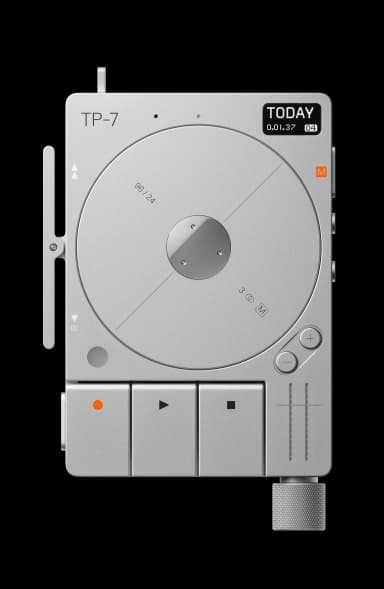
TP-7 FAQ

12 answers to the most common questions about the Teenage Engineering TP-7. Can't find what you need? Ask the AI.

How do I start recording on the TP-7?

Starting a recording on the TP-7 is straightforward. Press record to arm the device (the recording LED will flash), then press play to begin recording...

How does audio scrubbing work?

Audio scrubbing on the TP-7 lets you manually navigate through recordings by physically moving the tape reel or pressing the side rocker. You can hear...

What is the field system?

The field system is Teenage Engineering's collection of ultra-portable professional audio devices designed for mobile recording and production work....

How do I connect via USB-C?

Connect the TP-7 to your computer using a USB-C cable. The TP-7 acts as a USB audio class 1 compliant device, functioning as a multi-channel audio int...

How do I use the memo function?

The memo function lets you quickly capture voice recordings without entering record mode. Press and hold the memo button on the right side of the devi...

How do I edit a recording?

You can edit recordings by entering edit mode, which lets you overdub or overwrite specific sections of individual tracks....

How do I overdub on the TP-7?

Overdubbing on the TP-7 lets you record new audio on top of existing recordings without erasing what's already there. This is useful for layering voca...

How do I use varispeed?

Varispeed lets you adjust playback speed up or down, like changing tape speed on a classic reel-to-reel. You access it through the up/down buttons dur...

How do I use the TP-7 with TX-6?

The TP-7 and TX-6 work together as a complete multitrack recording and mixing system. Connect them via USB-C cable, then use the TX-6's mixer controls...

How do I use Bluetooth on the TP-7?

The TP-7 uses Bluetooth LE (Low Energy) for wireless connection to the companion transcription app on your phone....

How do I transfer files to a computer?

Connect your TP-7 to your computer using a USB-C cable. The device will appear as a storage device, allowing you to browse, copy, and transfer audio f...

How do I use the companion app?

The TP-7 companion app is a free transcription tool for your phone that converts recordings to text and enables easy sharing....

Have a different question?

Ask the AI assistant anything about your TP-7

Ask a Question →