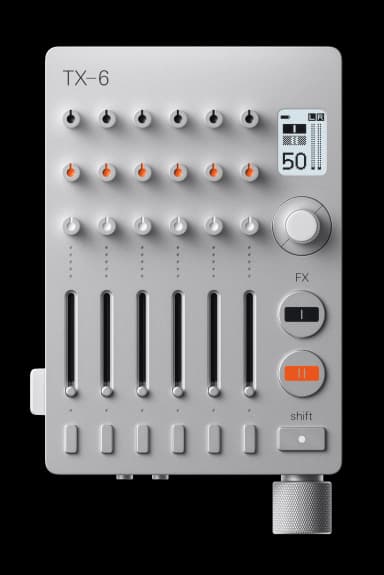
TX-6 FAQ

15 answers to the most common questions about the Teenage Engineering TX-6. Can't find what you need? Ask the AI.

How do I get started with the TX-6?

Getting started with the TX-6 is straightforward. Flip the power switch to the up position (the LED lights up), connect your audio sources to any of t...

How do I connect my inputs?

The TX-6 has six 3.5mm stereo mini jack inputs on the top side. Each input can be configured in four different ways depending on what you're connectin...

How do the effects work on the TX-6?

The TX-6 has two independent effect processors that work in different ways to shape your sound....

How do I use the TX-6 as a USB audio interface?

The TX-6 functions as a 12-channel USB audio interface with three different routing modes. Connect it to your computer or iOS device via USB-C (MFi ce...

How do I use the EQ?

The TX-6 has a 3-band EQ on each channel with ±18 dB of boost or cut. The three parameter knobs control high, mid, and low frequencies....

How do I use the aux output?

The aux output is a second output that can be used for external effects loops, recording performances, or sending audio to another device. Press the a...

How do I use the cue output for monitoring?

The cue output lets you monitor selected channels independently from the main mix, perfect for previewing tracks before bringing them into your perfor...

How do I use the disk recorder?

The disk recorder captures your mix as a stereo WAV file directly to a USB drive. Connect a FAT-formatted USB drive (MBR partition scheme) and the TX-...

How do I use synth mode?

Synth mode turns each of the TX-6's six channels into a sound generator that mixes with the input signal. You can trigger sounds manually, sequence pa...

How do I use DJ mode?

DJ mode turns channel 1's fader into a crossfader between channels 5 and 6, perfect for mixing between two decks. Channel 1 is disabled in this mode....

How do I sync with Pocket Operators?

You can sync TX-6 with Pocket Operators using the sync output feature, which sends a click track through the left channel of either the aux or cue out...

How do I use Bluetooth MIDI?

The TX-6 supports wireless MIDI connections via Bluetooth LE in two different modes....

How do I use the headset microphone?

Connect a headset with a microphone to the cue output jack. Hold SHIFT and press the cue button to access the headset mic controls....

How do I use the instrument tuner?

The TX-6 has a built-in instrument tuner that detects the pitch of incoming audio signals....

How do I factory reset the TX-6?

You can restore the TX-6 to factory settings through the system menu. This will erase all custom settings and return the device to its original state....

Have a different question?

Ask the AI assistant anything about your TX-6

Ask a Question →