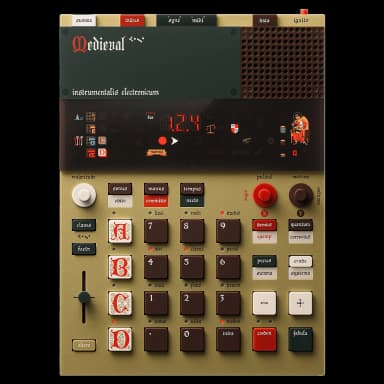
EP-1320 FAQ
25 answers to the most common questions about the Teenage Engineering EP-1320. Can't find what you need? Ask the AI.
How do I get started with the EP-1320?
The EP-1320 Medieval comes loaded with factory sounds ready to use. Start by exploring existing demo songs (press demus while stopped and select paed ...
What makes this different from EP-133?
The EP-1320 Medieval is a themed variant of the EP-133 K.O. II with identical core functionality but medieval aesthetics and Latin button labels....
How do I sample a sound on the EP-1320?
Sampling on the EP-1320 captures audio from the built-in microphone or line input and stores it in one of 500 available user slots....
How do I create a pattern on the EP-1320?
You create patterns by recording or sequencing notes on one of the four groups (A-D). Each group can hold up to 99 patterns, and each pattern can be u...
How do I use the built-in sounds?
The EP-1320 comes with 220 factory sounds stored in read-only memory. You can load them onto any paed in any group....
What are all the Latin button names?
The EP-1320 Medieval uses Latin names for all buttons instead of English. Here's the complete reference....
How do I use the effects (pocus)?
Press pocus while a pattern is playing to activate effects. The current effect will show on the display....
How do I chop a sample on the EP-1320?
# How do I chop a sample on the EP-1320?...
How do I use keys (claves) mode?
Keys mode lets you play sounds chromatically across the 12 pads, turning your EP-1320 into a keyboard. Press claves to activate it on the selected pad...
How do I commit a scene?
committo (commit) saves your current work and creates a new scene based on what you just saved....
How do I copy and paste patterns?
Copying and pasting patterns is essential for building song arrangements and creating variations without starting from scratch....
How do I use the fader (faedr)?
The faedr controls different parameters for each group. By default it adjusts group volume, but you can reassign it to control other functions....
How do I change the tempo (tempus)?
You can adjust the tempo by pressing tempus and using KnobX to change the BPM. The knob range is 60-180 BPM, but you can access the full 40-399 BPM ra...
How do I factory reset the EP-1320?
A factory reset will delete all user content and settings but keep the factory ROM sounds intact. Always update the firmware after resetting....
How do I use the demo songs?
The EP-1320 Medieval has 9 built-in demo songs that showcase the device's capabilities and provide inspiration....
How do I connect MIDI devices?
The EP-1320 Medieval connects to MIDI devices via 3.5mm TRS-MIDI cables or USB-C. You can use it with keyboards, controllers, drum machines, or other ...
How do I use note repeat (quantum)?
Note repeat lets you trigger rapid repetitions of a sound without having to tap repeatedly. Press and hold quantum while pressing a pad to activate au...
How do I sync with other gear?
The EP-1320 can sync with other gear using sync cables, MIDI, or USB. Choose the method based on what you're connecting to....
How do I erase recordings?
You can erase recordings in several ways depending on what you want to remove....
How do I update the firmware?
Connect your EP-1320 to a computer using the USB-C cable, then visit teenage.engineering/apps/update and follow the on-screen instructions....
How do I use mute groups?
Mute groups let you set up sounds so that only the last one you play will sound, automatically cutting off the others. This is useful for hi-hat patte...
How do I build a full song?
Building a full song involves creating scenes and using the commit function to structure different sections of your track....
How do I use step sequencing?
Step sequencing lets you place notes precisely on a grid without playing them in real time. This is ideal for building drum patterns, basslines, and m...
How do I make a medieval beat?
The EP-1320 has medieval-themed factory sounds perfect for period-appropriate beats. Load drums (sounds 1-69), phrases (70-114), and instruments (115-...
How do I use the dimension expander effect?
The dimension expander is one of seven built-in effects that stretches mono audio into stereo space....