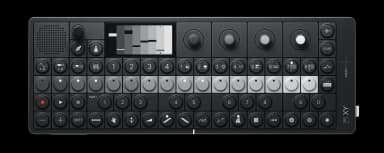
OP-XY FAQ

25 answers to the most common questions about the Teenage Engineering OP-XY. Can't find what you need? Ask the AI.

How do I create my first sequence?

Creating your first sequence on the OP-XY is straightforward. Press a note on the keyboard, then press a step button in the sequencer to place that no...

How do step components work?

Step components let you add 14 different types of variations to individual sequencer steps, creating complex patterns without permanent changes to you...

How do I use the arpeggio player?

The arpeggio player automatically arpeggiate notes you hold down, creating rhythmic melodic patterns from chords or single notes....

What is punch-in FX?

Punch-in FX is a real-time audio manipulation feature on Auxiliary Track 2 that lets you apply effects by playing keys on the keyboard while your sequ...

How do I sample a sound on the OP-XY?

Sampling on the OP-XY is straightforward. Press Sample (top right, waveform icon) to enter the sampling interface. You can record up to 20 seconds per...

How does the brain work?

The Brain is OP-XY's intelligent transposition system on Auxiliary Track 1. It automatically detects the key signature of your music and transposes no...

How do I use the Maestro player?

The Maestro player transposes and plays back a recorded sequence of notes based on the keys you press, letting you create complex melodic patterns wit...

How do I use the Hold player?

The Hold player sustains notes until the next one is played, making it ideal for bass lines and chord progressions....

How do I link tracks?

Linking Tracks...

How do I use the drum sampler and slicing?

The drum sampler lets you assign up to 24 one-shot samples across the keyboard, with powerful slicing tools for breaking up longer recordings into ind...

How do I use the multisampler?

The multisampler lets you record different samples across the keyboard to create layered instruments with up to 24 zones. It's perfect for creating pl...

How do I create a song with scenes?

Creating songs with scenes lets you build complete arrangements by chaining together different pattern combinations....

How do I use the mixer and EQ?

The Mix mode controls levels, panning, EQ, saturation, and master compression across all tracks. Press the Mix button to enter....

How do I use the saturator?

The saturator is a mixing tool that adds harmonic richness and warmth to your tracks by introducing subtle to aggressive distortion....

How do I use external MIDI?

External MIDI lets you control external gear from the OP-XY. You can sequence synths, drum machines, or other MIDI devices using OP-XY's sequencer and...

How do I use CV/gate output?

CV/gate output lets you control external analog synthesizers directly from the OP-XY sequencer using voltage signals....

How do I use external audio?

External audio on the OP-XY lets you route outside sound sources through the device's filters, effects, and sequencer. Connect your audio source to th...

How do I use the tape track?

The tape track rearranges audio from other tracks to create glitch effects and tape-style manipulations....

How do I use Bluetooth MIDI?

# How do I use Bluetooth MIDI?...

How do I backup projects?

To backup your OP-XY projects, connect the device to your computer via USB-C and enable file transfer mode....

How do I load samples from a computer?

You can transfer samples to the OP-XY using MTP mode, which lets your computer access the device's file system directly....

How do I use parameter locks?

Parameter locks let you change a synth parameter on specific steps, creating evolving sequences and variation within a single pattern....

How do I change tempo and grooves?

You can adjust tempo and groove using the Tempo button in the top left corner of the device, next to the Projects button....

How do I use the pitchbend as modulation?

You can route the pitchbend strip to modulate any synthesis parameter instead of just pitch....

How do I factory reset the OP-XY?

A factory reset will completely erase all user data, projects, and settings from your OP-XY. Make sure to back up any important work first....

Have a different question?

Ask the AI assistant anything about your OP-XY

Ask a Question →